
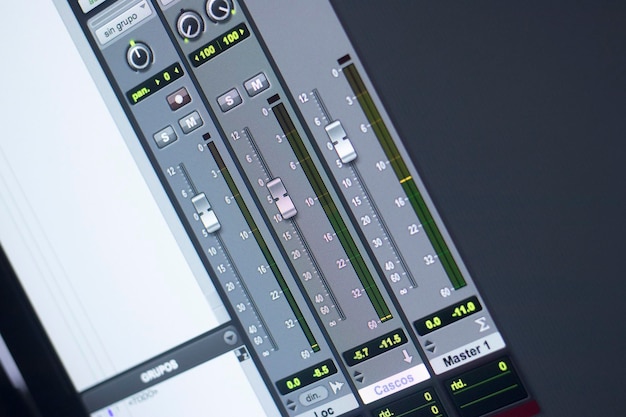
If you’re venturing into the world of audio production, understanding the basics of Pro Tools is essential for building a strong foundation. Recognized as the industry standard digital audio workstation (DAW), Pro Tools has been a cornerstone in professional recording studios since its inception in 1989. Its evolution from Sound Tools to a fully accessible software suite without the need for specialized hardware has opened doors for both new producers and seasoned professionals alike. In this ultimate guide, we’ll explore the key features, setup processes, and recording techniques that will empower you to harness Pro Tools effectively, ultimately enhancing your creative workflow and audio projects. Join us as we demystify the powerful capabilities of Pro Tools DAW, setting you on the path to mastering audio production.
Pro Tools DAW Basics Overview
Avid Pro Tools stands as the industry’s premier digital audio workstation (DAW), widely recognized in professional recording studios and increasingly appealing to budding producers.
Originally emerging from a software called Sound Tools in 1989, Pro Tools quickly secured its status as the go-to DAW for many commercial studios by the early 2000s.
The evolution of Pro Tools has made it more accessible to a wider audience. Modern versions of the software no longer require dedicated DSP hardware. This shift enables producers and musicians to utilize Pro Tools on standard computers, simplifying the entry into professional audio production.
Pro Tools supports a wide range of flexible audio editing workflows, allowing users to work with multiple track types, including audio, MIDI, aux inputs, and even video tracks. This versatility is indispensable in modern music production, as it allows greater creativity and collaboration.
The software is lauded for its strong foundation in stability. It’s designed to handle critical recording tasks without risking downtime, which is crucial in professional environments.
Each version of Pro Tools—Intro, Artist, Studio, and Flex—caters to varying skill levels and project requirements. They come equipped with a diverse suite of AAX Native plugins, helping users achieve professional sound design and mixing capabilities.
As the world of audio production continues to evolve, Pro Tools remains at the forefront, demonstrating an enduring commitment to meeting the needs of its users across all levels of expertise.
Key Features of Pro Tools DAW
Pro Tools offers several editions, each tailored to various skill levels, including Intro, Artist, Studio, and Flex.
Each version comes equipped with essential AAX Native plugins, enhancing the user experience and functionality.
The software is renowned for its stability, making it the go-to choice for critical recording scenarios where reliability is paramount.
Different Editions of Pro Tools
Pro Tools Intro: A free entry-level version limited to 8 audio tracks and designed for beginners to explore basic functionality.
Pro Tools Artist: At $99 per year, this edition allows up to 32 audio tracks and includes MIDI support, making it perfect for emerging producers.
Pro Tools Studio: Priced at $299 per year, it supports up to 512 audio tracks and 64 channels of simultaneous I/O, ideal for serious creators seeking advanced features.
Pro Tools Flex: Designed for large facilities, this top-tier option requires HDX or HD Native DSP hardware for advanced audio production.
Advanced Capabilities
Pro Tools incorporates advanced editing features that set it apart from other DAWs:
Beat Detective: Allows users to compensate tracks to match a tempo grid, ensuring tracks stay in sync.
Elastic Audio: Enables precise pitch and time manipulation, enhancing the flexibility of audio tracks for intricate editing tasks.
With its robust focus on various skill levels, powerful plugins, and advanced capabilities, Pro Tools remains an essential tool for audio recording and editing.
Setting Up Pro Tools DAW
To get started with Pro Tools, you need to ensure proper hardware and software integration. A crucial requirement is a hardware iLok for license management. This USB device securely stores your Pro Tools license, which is necessary to run the software efficiently.
Computer Requirements
Your computer should meet the following minimum specifications for optimal performance:
Operating System: Pro Tools supports both macOS and Windows, but ensure you’re using a compatible version.
Processor: Ideally, a multi-core processor for efficient audio processing.
RAM: At least 8GB is recommended, but 16GB or more is preferable for heavier projects.
Storage: A solid-state drive (SSD) will significantly improve loading times and performance.
Audio Interfaces
Pro Tools supports a variety of audio interfaces which enhance its usability. These devices allow you to connect microphones, instruments, and other audio equipment. Common interfaces include USB, Thunderbolt, and FireWire models.
Installation Process
Download Pro Tools: Start by downloading the installation file from the official site.
Run the Installer: Open the file and follow the on-screen instructions to install Pro Tools on your computer.
Set Up Your iLok: Insert your hardware iLok and follow any prompts to ensure it’s recognized by your system.
Initial Configuration: After installation, open Pro Tools and go through the setup process, which includes configuring audio devices and creating a new session.
Explore Templates: Pro Tools offers various templates to kick-start your projects; this can save time and streamline your workflow.
By ensuring your hardware meets these specifications, and following the installation steps, you’ll be well on your way to utilizing Pro Tools for your audio production needs.
Recording in Pro Tools
Pro Tools supports robust audio recording capabilities, allowing for tracking up to 512 audio tracks, making it a powerful tool for producers and musicians alike.
The recording process in Pro Tools begins with setting up your session. Choose the appropriate sample rate and bit depth based on your project needs, and select your input sources via your audio interface. This flexibility is crucial for capturing high-quality recordings across various instruments and vocals.
One standout feature for recording is Quick Punch. This allows users to easily perform overdubs without stopping the playback, which is beneficial for capturing that perfect take. When you enable Quick Punch, Pro Tools can automatically archive previous takes, so you have the option to revisit them later.
Efficient session organization is essential for a smooth workflow. Here are some best practices for audio recording in Pro Tools:
Label Your Tracks: Rename and color-code your tracks for easier navigation.
Use Separate Tracks for Each Instrument: Recording each instrument on its own track allows for greater mixing flexibility.
Check Levels Before Recording: Ensure that your input levels are set appropriately to avoid clipping or distortion during recording.
Create a Tracking Template: Having a pre-arranged template with your typical settings can save time on future sessions.
Utilize Record Safe Mode: Engaging Record Safe for tracks you don’t want to record over helps prevent accidental overwrites.
Take Advantage of Playlists: Use playlists to manage multiple takes for a single track, making it easier to comp the best performances.
By following these practices, you’ll not only streamline your recording process but also enhance the overall quality of your audio productions in Pro Tools. The combination of its powerful features and flexible workflow positions Pro Tools as a go-to choice for both newbie and seasoned professionals in the recording world.
Mixing and Editing in Pro Tools
Pro Tools is equipped with a wide range of tools essential for mixing and editing, allowing professionals to refine their audio productions with precision.
Key features like EQ and compression plugins are crucial in shaping the overall sound of a mix.
These effects enable users to enhance or reduce specific frequencies, achieving a polished final product.
Applying compression helps control dynamics, ensuring that no element in the mix gets lost, especially in complex arrangements.
Automation further amplifies Pro Tools’ capabilities, allowing users to adjust levels, panning, and effects dynamically throughout a track, creating a more engaging listening experience.
The intuitive interface of Pro Tools ensures that the mixing process is streamlined.
This user-friendly layout allows producers to focus more on creativity rather than navigation, making it easier to access essential tools.
Editing is made efficient with features such as the Edit Window and Mix Window, which provide a clear overview of all elements in a session.
Users can utilize keyboard shortcuts for faster navigation, enhancing workflow speed significantly.
Here are some techniques to enhance your mixing and editing process:
Utilize Automation: Automatically adjust volume and effects parameters at specific points in your track.
Master EQ Techniques: Use equalization to carve out space in the mix for each instrument, avoiding frequency clashes.
Experiment with Compression: Understand different types of compression (such as peak and RMS) and apply them strategically to create depth in your mix.
Layer Sounds: Don’t be afraid to layer multiple sounds to enrich the auditory experience; just ensure each layer complements the others.
Careful Track Management: Keep your session organized by labeling tracks and utilizing color coding.
Pro Tools equips users with powerful features and an intuitive interface, allowing mixing and editing workflows to flow smoothly, making it an invaluable asset in audio production.
Pro Tools DAW Tutorials and Resources
Learning Pro Tools can be a complex journey, yet numerous tutorials and resources can make it manageable.
Consider starting with video tutorials available on popular platforms. These often provide visual aids that can significantly enhance your understanding.
Additionally, various websites offer written guides and forums that cater specifically to Pro Tools users. Engaging with community forums can provide insights from experienced users, helping you overcome specific hurdles.
Utilizing project templates is another effective tip. They help streamline your workflow and familiarize you with session management.
Here are some resources to enhance your learning:
Video Tutorials
Search for video series focusing on Pro Tools basics and advanced techniques.User Forums
Participate in discussions to ask questions and share experiences.Official Documentation
Refer to Avid’s official manuals for comprehensive guidance on features and functionalities.Online Courses
Enroll in structured courses from music production schools or platforms dedicated to audio production.Webinars and Workshops
Live sessions can provide real-time interaction and hands-on experience.
Incorporating these resources into your learning plan can empower you to master Pro Tools efficiently. Taking the time to explore innovative production tips shared by professionals also enhances your skill set.
In summary, mastering the essentials of Pro Tools DAW Basics equips you with the tools needed for successful music production.
Understanding its user interface, key features, and audio editing techniques can significantly enhance your workflow and creativity.
As you explore mixing and mastering within Pro Tools, you’ll unlock the potential to achieve polished, professional tracks.
Additionally, troubleshooting common issues ensures a smoother experience and allows you to maximize your productivity.
Ultimately, diving into Pro Tools will not only sharpen your technical skills but also elevate your music-making journey.
With dedication and practice, you’ll become proficient in this industry-standard digital audio workstation, forging your path in the vast world of sound.
Embrace the learning process and enjoy the creative possibilities that come with Pro Tools DAW Basics.
FAQ
Q: What are the key features of Pro Tools?
A: Pro Tools provides non-destructive audio editing, supports multiple track types, and includes powerful audio effects and plugins, which are essential for professional music production.
Q: How can I purchase Pro Tools?
A: Pro Tools offers several editions for different skill levels, including Pro Tools Intro (free), Artist ($99/year), Studio ($299/year), and Flex (availability of DSP hardware required).
Q: Why is Pro Tools considered popular in the music industry?
A: Pro Tools is recognized for its high stability, advanced audio editing capabilities, and its status as the industry standard DAW, widely used among professionals and emerging producers alike.
Q: What are some audio editing techniques available in Pro Tools?
A: Pro Tools features Elastic Audio for pitch and time manipulation and Beat Detective for aligning audio with a tempo grid, crucial for effective audio production.
Q: How straightforward is it to navigate the Pro Tools user interface?
A: Pro Tools has a customizable layout, including the Edit Window and Mix Window, designed to streamline workflows and enhance productivity for users, even beginners.
Q: What types of tracks can I create in Pro Tools?
A: Pro Tools supports various track types, including audio, MIDI, aux inputs, and video tracks, allowing for versatile project organization and effective management.
Q: What features can enhance my mixing and mastering in Pro Tools?
A: Key mixing tools include faders, pans, sends, and built-in mastering capabilities, allowing users to produce high-quality, radio-ready tracks in their projects.
Q: How does Pro Tools assist in music production?
A: Pro Tools supports various virtual instruments and MIDI editing features, facilitating a wide range of music production tasks from arranging to sound design.
Q: What are common troubleshooting tips for Pro Tools?
A: Users often encounter issues like latency and plugin compatibility; leveraging Pro Tools’ troubleshooting guide and community forums can provide effective solutions.





